
When you create a shipping label in Ordoro, you may see both a Weight field and a Packaging Weight field. These fields work together, but they do not mean the same thing.
They help you build a more accurate total shipping weight before you buy the label.
Topics
- What is the difference between Weight and Packaging Weight?
- Why is Packaging Weight helpful?
- How does this look before label creation?
- How does this look after label creation?
- How does this appear in exports?
What is the difference between Weight and Packaging Weight?
Weight is the weight of the products in the order.
This can come from:
- The product weights assigned to each SKU, or
- A value entered in the Weight field in the Shipping Label panel..
This field is meant to reflect the weight of the items themselves, not the box or packing materials.

Packaging Weight is the additional weight of the materials used to ship the order.
This may include: boxes, mailers, bubble wrap, packing paper, inserts, or other packing materials.

Why is Packaging Weight helpful?
Packaging Weight helps more accurately reflect the full shipment weight.
This is useful since the products alone may not be the full weight of the package. If you use a box, protective materials, or inserts, those materials also add weight.
For example, you might have:
- products that weigh 4 lb 1 oz
- packaging materials that add 1 lb 2 oz
In that case, the full shipment weight is 5 lb 3 oz.
Using Packaging Weight can help you:
- Send a more accurate total weight to the carrier
- Help avoid issues from underreported package weight
- Keep your workflow clearer when product and packaging weight need to be tracked separately
How do I update Packaging Weight?
- Select the order to update.
- In the Label Panel, click View/Edit under Additional Carrier Options.
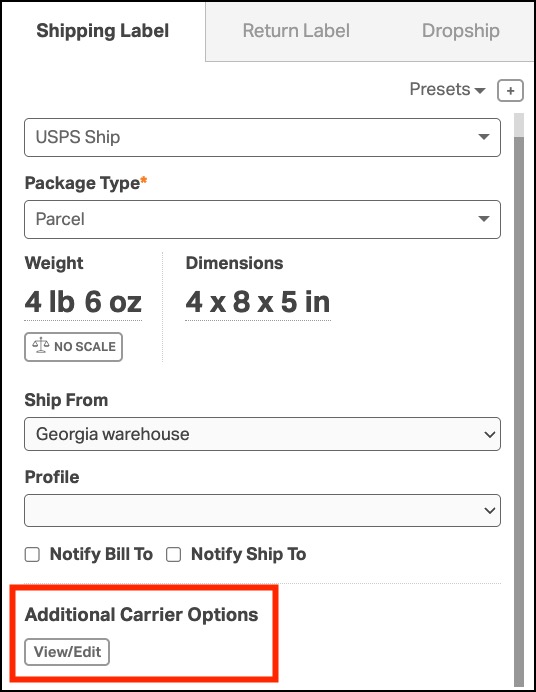
- Enter the packaging weight in the Packaging Weight field.
- Click Save.

How does this look before label creation?
Before you create a shipping label, Ordoro shows Weight and Packaging Weight as two separate fields.
At this stage:
- The values are shown separately
- You can review each one on its own
- The UI does not yet show them as one combined total
This makes it easier to confirm both the product weight and the packaging weight before purchasing the label.

How does this look after label creation?
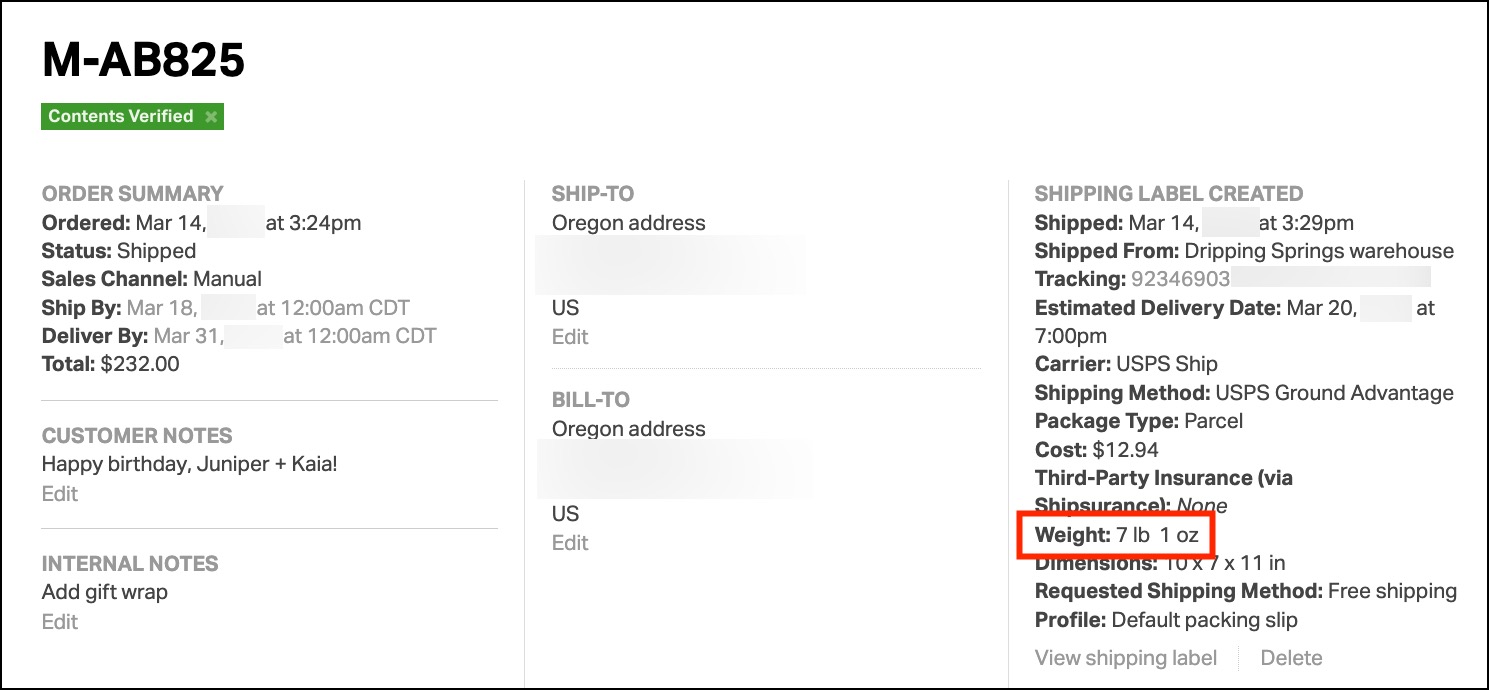
After a shipping label is created, Ordoro adds the two values together:
- Weight + Packaging Weight = Total Label Weight
That combined total appears in the Shipping Label Created section.
Example:
- Order Weight: 5 lb 9 oz
- Packaging Weight: 1 lb 8 oz
- Total label weight: 7 lb 1 oz
After label creation, the order shows the combined total rather than the two separate values.
How does this appear in exports?
Export behavior depends on the order status.
- When an order is in Awaiting Fulfillment, weight is not recorded in exports.
- When an order is in Shipped status, the export lists the total combined weight (Order Weight + Packaging Weight).