
If your products in Miva have attribute options for your customers to choose on checkout, you’ll need to take additional steps to help Ordoro track the inventory for those attribute choices. See instructions for setup in Miva below:
1. Log into your Miva account. In your attribute product in Miva, click on the Attributes tab. Under each attribute, make sure that the Track Inventory option is set to Yes. Then select Generate Variants.

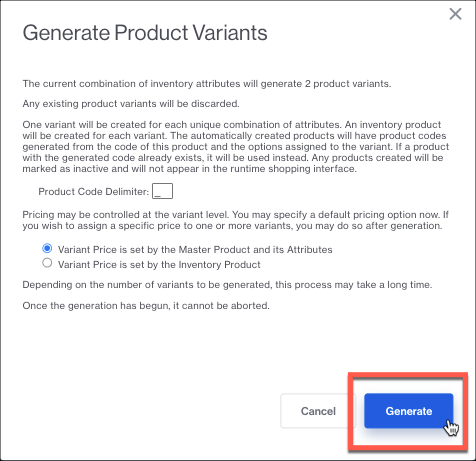
2. In the modal that opens up, choose your Variant delimiter and whether you’d like the price determined on the Marent or each Variant attribute. Then select Generate.
3. Select the Inventory Variants tab in Miva, to review the variants generated. You’ll see that the delimiter chosen will separate the Master Product code and the attribute variant choice. These will be the individual SKUs that import into Ordoro, allowing you to track the inventory per selected option.
NOTE: Changing product codes in Miva will import new products into Ordoro, so be sure to archive the old SKUs in Ordoro that you no longer use.


4. In Ordoro, you can now update the inventory for each attribute and Ordoro will keep the inventory for your variants in sync in Miva, alerting your customers when inventory runs out so that you don’t oversell your variants.