
When adjusting your inventory in Ordoro, you can enter a Reason for Adjustment. This update is designed to help your team track why updates are made, such as: improving accuracy, accountability, and long-term traceability.
Topics
Where to enter the reason
You’ll see a Reason for Adjustment field when manually updating your inventory in the following places:
- Product List page
- Click on the POH quantity for a specific warehouse.
- A modal will appear to adjust inventory. This is where you’ll enter the reason.
- Bulk inventory update
- When performing a bulk update across multiple SKUs, you’ll have the option to add a reason as part of the process.
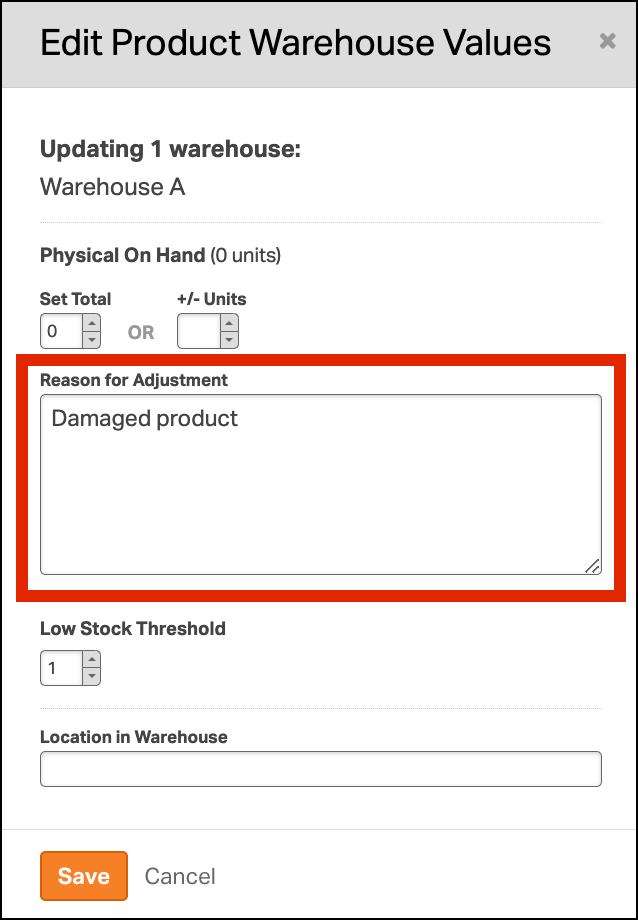
Examples of adjustment reasons
This field is flexible. Enter any note that helps clarify why the inventory was adjusted. Common examples include:
- Damaged stock
- Returned items
- Inventory recount
- Transfer to another warehouse
- Found missing stock
What happens to the reason you enter
- The reason is stored on the backend, though it’s not yet visible in the Inventory Log or elsewhere in the app.
- We plan to make this data more accessible in a future update.
- Need access now? Email support@ordoro.com, and we’ll be happy to export a history of your adjustments.