
If you’re ready to close your Pitney Bowes Merchant account or request a refund of your postage balance, here’s what to expect and how to move forward.
Topics
- Overview
- Reduce Auto-Refill Charges First (Recommended)
- Step 1: Submit Your Request to Pitney Bowes
- Step 2: Understand Processing Timing
- Step 3: How Refunds Are Issued
- What to Expect Next
Overview
Closing your account and receiving a refund requires working directly with Pitney Bowes Payments API Support.
You can submit your request at any time. However, Pitney Bowes cannot process it until certain waiting periods are complete (details below).
Reduce Auto-Refill Charges First (Recommended)
Auto-refill cannot be fully disabled, but you can reduce the chances of additional charges while waiting.
Here’s what we recommend:
- Log into your merchant portal.
- Set auto-refill to the minimum allowed values:
- Refill amount: $50
- Low balance threshold: $10
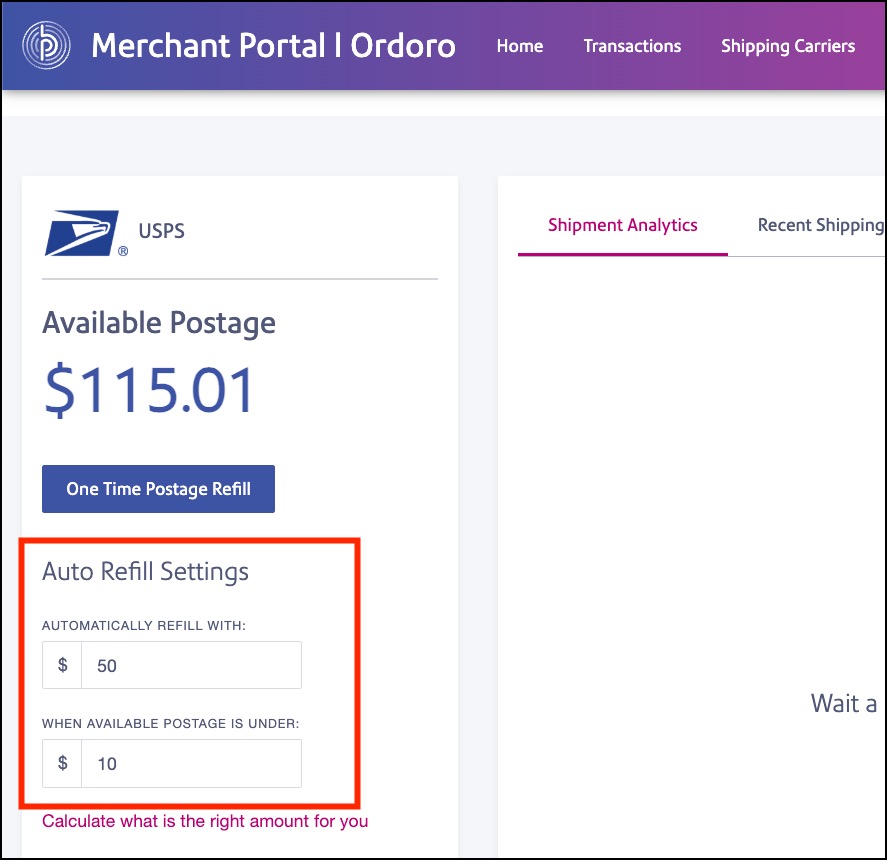
- (Optional) Spend your balance down to around $20
- This gives you a buffer above the $10 threshold
- It helps reduce the chance of triggering another auto-refill
- This step is optional. If you prefer, Pitney Bowes can refund your full remaining balance instead.
Step 1: Submit Your Request to Pitney Bowes
Send your request directly to: PaymentsAPISupport@pb.com
Be sure to include:
- Your company name
- Email address associated with your Pitney Bowes account
- (Optional) Account number, if you have it
- Your request:
- Close the account + refund, or
- Refund only (keep account open)
Email Template to copy and paste:
You can use this template:
Hello,
I’d like to request closure of my Pitney Bowes Merchant account and a refund of any remaining postage balance.
Company Name: [Your Company Name]
Account Email: [Email associated with your Pitney Bowes account]
Account Number (if available): [Account Number]Please let me know if you need any additional information to process this request.
Thank you!
(If you prefer to keep your account open but receive a refund, you can update the first sentence accordingly.)
Step 2: Understand Processing Timing
Pitney Bowes can only process your request after:
- 45 days from your last label printed
- 90 days from your last return label printed (if applicable)
These timeframes allow USPS to finalize any postage adjustments.
You don’t need to wait to send your request, but processing won’t begin until these windows have passed.
Step 3: How Refunds Are Issued
Refunds are typically sent back to the original payment method used to fund the account.
Exceptions:
- ACH-funded accounts → refund sent by check
- If the original payment method is no longer available → refund sent by check
What to Expect Next
After you submit your request:
- Pitney Bowes will review your account
- They may confirm timing if the waiting period is not yet complete
- Once eligible, they will process your closure and/or refund