Topics
- What is the “Terms of Sale” for FedEx?
- How do I select the “Terms of Sale”?
- Where does the “Terms of Sale” show up?
What is the “Terms of Sale” for FedEx?
The “Terms of Sale” is used for international shipping. While it may not be required depending on the country you’re shipping to, it can help move packages through the customs process. Customs agencies may use it to calculate duties and/or other import taxes, etc.
These are the selectable options in Ordoro:
- DDP (Delivered Duty Paid): The merchant/seller is responsible for shipping costs and duties.
- DAP (Delivered at Place): The merchant/seller is responsible for shipping charges, but the recipient/buyer handles duties, etc.
Note: The “Duties Payor” selection does not change the “Terms of Sale” as these two selections do not necessarily mean the same. (Ex. If I select “Recipient” as the Duties Payor, it will not automatically select “DAP” for the Terms of Sale.)
How do I select the “Terms of Sale”?
- On the Label Panel in Ordoro, make sure FedEx is selected as one of the carriers.
- Then click on “View/Edit” below the “Additional Carrier Options”.

- Scroll until you see “Terms of Sale”.
- You will see a dropdown without a selected option:

- Leave unselected or choose either “Delivered Duty Paid” or “Delivered at Place”.
- By default, this dropdown is blank.
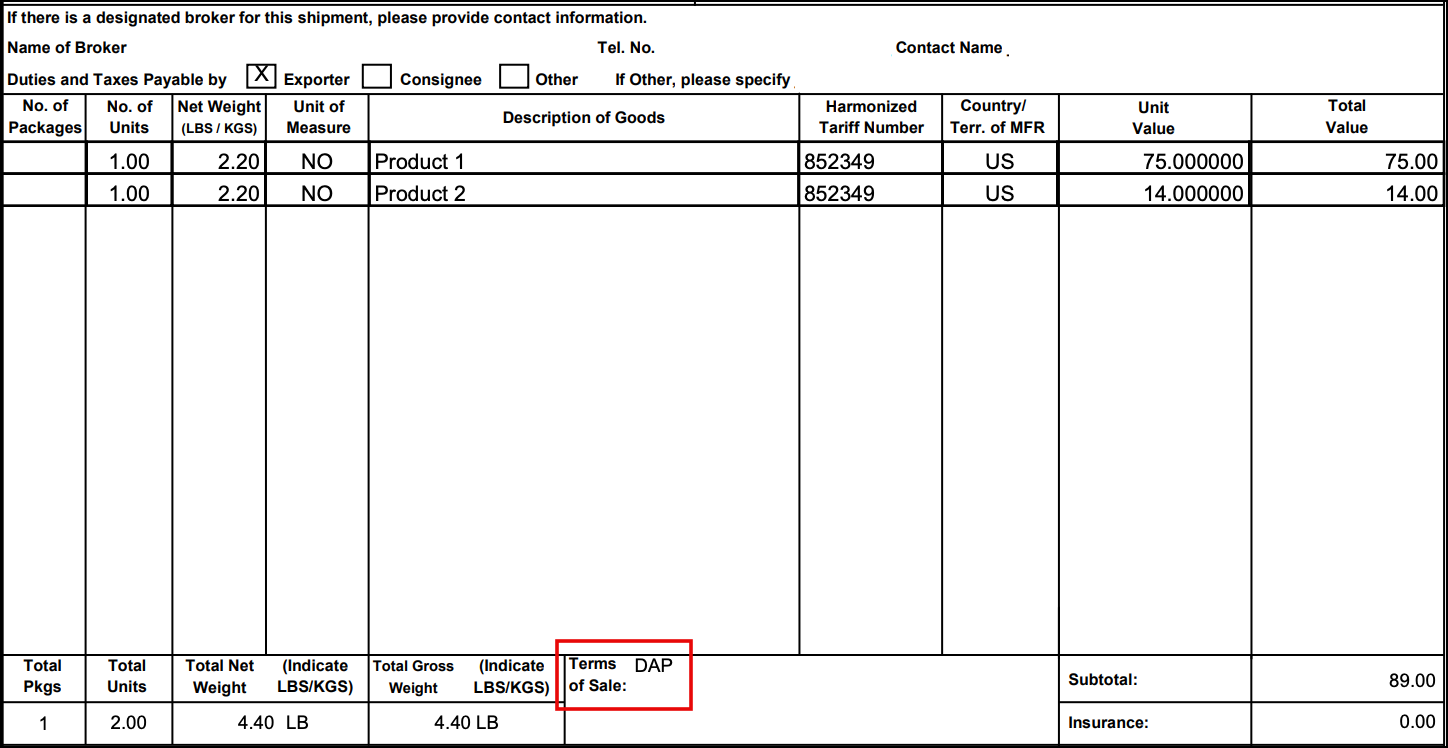
- If left blank, nothing will populate on the Commercial Invoice.
- Be sure to click on “Save”.
Where does the “Terms of Sale” show up?
If nothing is selected, the “Terms of Sale” field is left blank on the Commercial Invoice. Below is an example with “Delivered at Place” selected: