
Welcome to Ordoro’s comprehensive guide on calculating weighted average unit costs for your products! If you’re looking to gain a clear understanding of how to determine the weighted average unit cost for the items in your inventory, you’re in the right place!
Whether you’re tracking price changes for products received on Purchase Orders, or calculating kit costs based on their component costs, this article will break down the process in a simple and easy-to-follow manner. Join us as we delve into the world of inventory cost automation and how Ordoro can save time and ensure accurate cost calculations.
Topics
- What is Weighted Average Unit Cost?
- Enable automatic Weighted Average Unit Cost calculation
- Calculating Weighted Average Unit Costs via Purchase Order
- Calculating Weighted Average Unit Costs for Kit Products
What is Weighted Average Unit Cost?
Weighted Average Unit Cost is an inventory valuation method that accounts for both the cost and quantity of items on hand. Instead of using a simple average, WAUC gives more weight to items based on how many are in stock at a given cost.
In layman’s terms, this is a running average cost that emphasizes the cost of the in-house and recently received inventory.
Enable automatic Weighted Average Unit Cost calculation
Ordoro can help you automate your Weighted Average Cost calculations. Review the steps below to enable these features:
1. Click on your Company Name -> Account Settings.
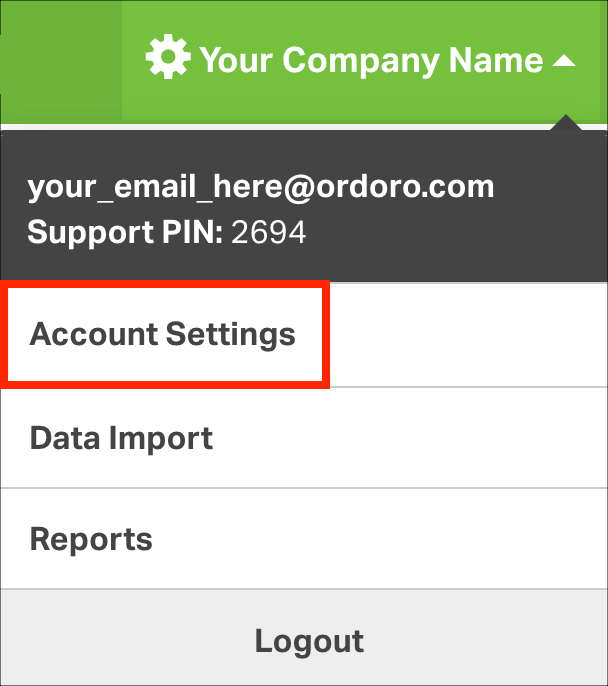
2. Scroll down to the bottom of the page where you’ll see Recalculate Weighted Average Unit Cost upon goods receipt and Recalculate kit WAUC when a component WAUC is changed.

These two settings can help you automate your Weighted Average Unit Cost Calculations.
- Recalculate Weighted Average Unit Cost upon goods receipt: This setting will let Ordoro update the Weighted Average Unit Cost of your product when it is received on a PO at a new cost. See details below.
- You can also select Include Shipping and Handling, Tax, and PO Discounts in the calculations.
- Recalculate kit WAUC when a component WAUC is changed: This setting will let Ordoro overwrite the Weighted Average Unit Cost for your Kit Products with the combined costs of the kit’s component products. See details below.
NOTE: If you receive Kit products on POs, you should not use both of these settings at the same time. If enabled, your KIT WAUC will not be reliable, as it can be re-calculated via PO receipt and Component price changes.
3. Check the check mark boxes next to the settings you want to enable, and then select Save.
Calculating Weighted Average Unit Costs via Purchase Order
When enabled, Ordoro recalculates the WAUC whenever you receive products through a Purchase Order. This is the calculation Ordoro makes upon receipt:
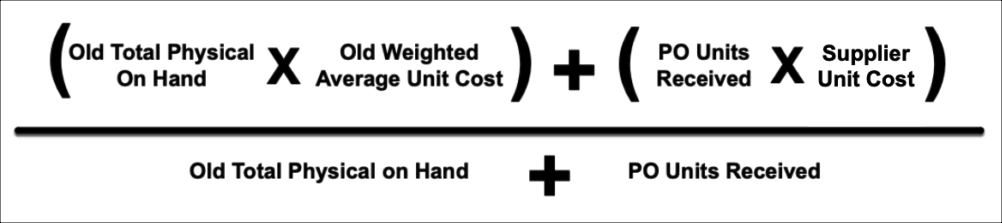
Ordoro sums your current inventory at the current WAUC, and the new units received at the new price, and then divides that by the total units on hand after receipt.
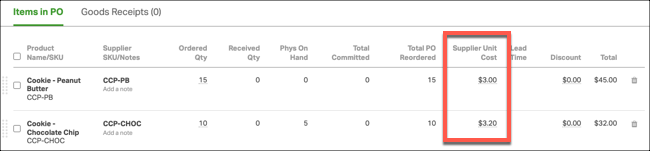
For Example, in this PO, we can see two items: Cookie – Chocolate Chip and Cookie – Peanut Butter. Their new price on this PO are $3 and $3.20.
Both products currently have a WAUC of $1. Note that Cookie – Chocolate Chip has 5 total units on hand. Those units are considered to be at that $1 cost.
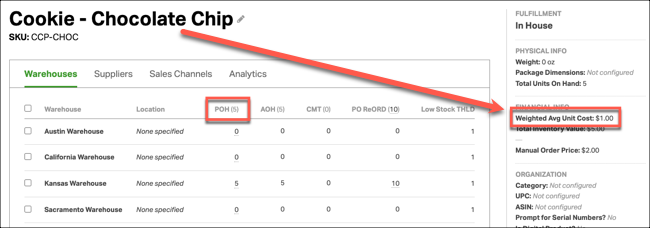

Using the Cookie – Chocolate Chip product, the new cost calculation would look like this:
New Cost = [(Current Units x Current WAUC) + (Received Units x Supplier Cost from PO) ÷ Total Units after receipt.
OR
2.4666666666 or $2.47 = [(5 x $1) + (10 x $3.20)] ÷ 15
Other Notes:
- This calculation happens when you save a Goods Receipt. We do not recommend editing Goods Receipts in combination with this setting. You cannot re-set the old WAUC after you’ve received against that product.
- If your current inventory is zero or negative, the WAUC resets based only on the new Supplier Unit Cost from the PO.
- Ordoro stores the WAUC up to 10 decimal places, but this level of precision isn’t displayed in the app. Ordoro will display the number rounded up to two decimals.
- Over-received items are not included in WAUC calculations.
If you’ve enabled the Include Shipping and Handling, Tax, and PO Discounts setting, the Discount, Shipping & Handling and Tax amount will be evenly spread across all units received on the PO.
For example, in the PO below, you’ll see two cookie products combining to 25 units total on the PO. There’s a $10 discount on the PO as well.
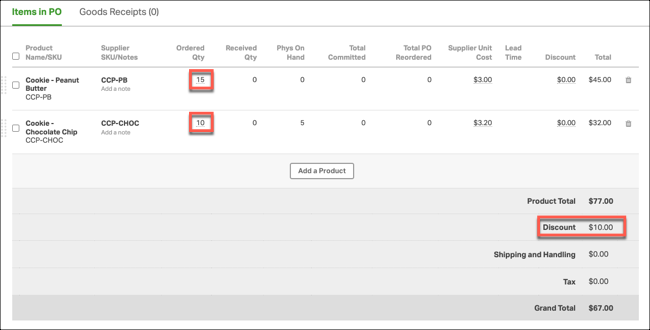
Upon receipt, Ordoro would reduce the Supplier Unit Costs used to recalculate the WAUC of these products by $0.40. That’s because there’s a $10 discount on the PO ($10 discount ÷ 25 total units on the PO = $0.40).
For this PO, the price used for CCP-PB would be $2.60 and CCP-CHOC would be $2.80 when you use the Include Shipping and Handling, Tax, and PO Discounts option with the Weighted Average Unit Cost Calculation. If this setting is disabled, we’d use the Supplier Unit Cost from the lines on the PO (CCP-PB would be $3.00 and CCP-CHOC would be $3.20)
Other notes for the Include Shipping and Handling, Tax, and PO Discounts setting:
- PO-level fees and discounts are split evenly across all items in the PO, not weighted by line cost.
- Example: A $1000 shipping fee on a PO with 2 lines (each with 100 units) will increase the unit costs equally, regardless of item price.
- Line-level discounts are divided by item quantity only for that product line.
- Example: In our PO above, if discount only on the line for CCP-CHOC, that discount would only apply to that line. A $10 discount on the CCP-CHOC would reduce the cost of CCP-CHOC by $1 and CCP-PB wouldn’t be affected.
- Partial receipts are proportionally considered.
- Example: Receiving 3 items out of 20 means 15% of PO-level discounts/fees are applied.
- Over-received items are not included in WAUC calculations.
Calculating Weighted Average Unit Costs for Kit Products
When enabled, Ordoro recalculates the WAUC of your Kit products when your component product has a WAUC change. The calculation is this:
Kit WAUC = (Component 1 WAUC X Units Needed per Kit) + (Component 2 WAUC X Units Needed per Kit) … Calculated for each component of the Kit.
NOTE: When you enable this setting, Ordoro will not immediately update your Kit products’ WAUC. This only recalculates when a component product’s cost is changed or if components are changed on the Kit Product
For example, the Kit Product Quilt+Sham Bundle Product doesn’t have a WAUC yet.
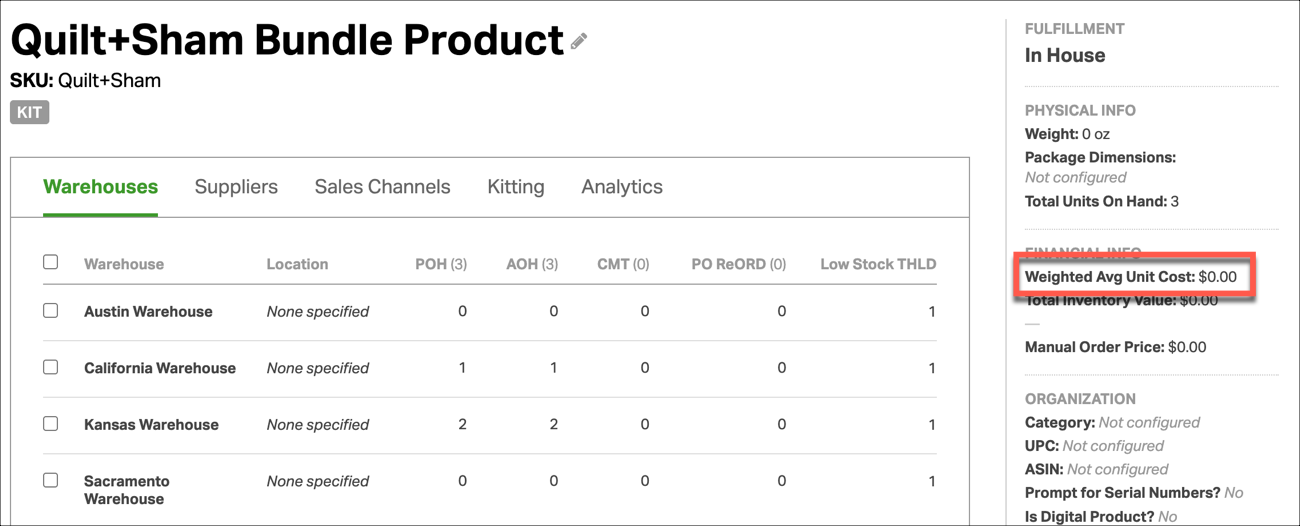
This Kit is made of two products: One Quilt and Two Shams. The Quilt has a $45 WAUC and the Sham has a WAUC $20.
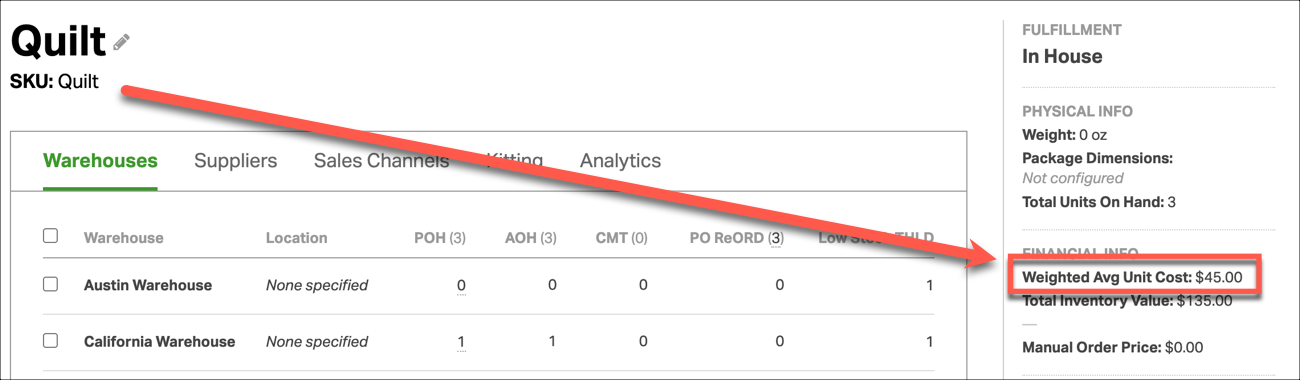
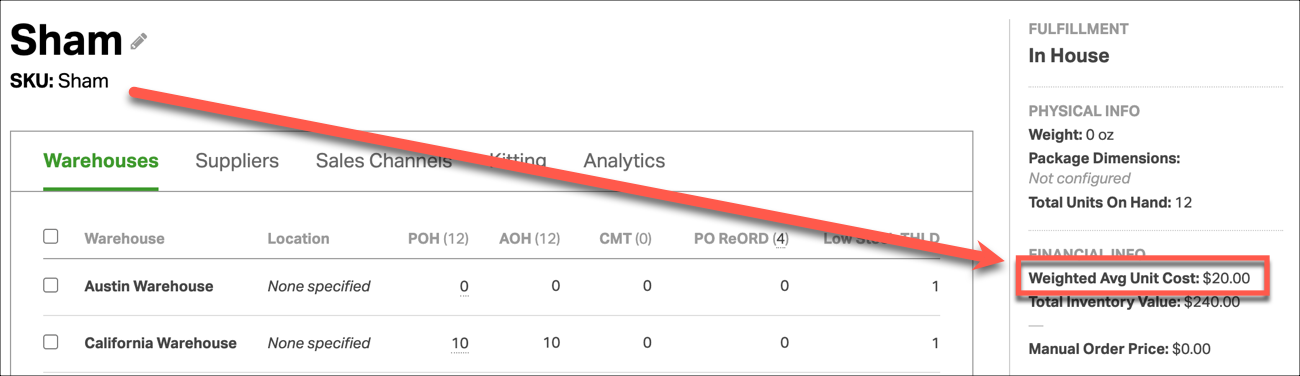
When the the WAUC of one of these components changes, you’ll see the Kit’s WAUC update:
Quilt+Sham Bundle Product WAUC = (Quilt WAUC X 1) + (Sham WAUC X 2) .
OR
$85 = ( $20 X 2) + ($45 X 1)
