
Yes, you can. FedEx can deliver eligible shipments on a Saturday, instead of waiting until the next business day.
If your FedEx service and destination support Saturday Delivery, you can request it right from Ordoro.
Topics
- Before you start
- How to tell if Saturday Delivery is available
- Create a FedEx Saturday Delivery label
- Only show Saturday Delivery rates
Before you start
- Saturday Delivery is an extra service, and it may change the rate you see.
- Not all shipments qualify. Availability depends on the FedEx service, destination address, and other shipment details.
- You may need to refresh rates after turning on Saturday Delivery to see eligible options.
How to tell if Saturday Delivery is available
When Saturday Delivery is available for the shipment, you will see a yellow badge next to the delivery date in the Rates box.
If you do not see the badge, Saturday Delivery may not be available for the current service or shipment.

Create a FedEx Saturday Delivery label
- Go to Orders and select the order you want to ship.
- In the Shipping Label panel, choose FedEx as the carrier.

- View the shipping rates. If Saturday Delivery is available, the yellow badge will appear.
- In the screenshot below, FedEx Standard Overnight appears twice.
- The first option delivers on February 2 for $99.28.
- The second option (Saturday Delivery) delivers on January 31 for $118.52.

- Create the label as usual.
- Once the label is created, you’ll see an indicator on the label confirming Saturday Delivery.

Only show Saturday Delivery rates
If you would like to see only Saturday Delivery options, you can filter your rates to show only Saturday-eligible services.
- In the Shipping Label panel, find Additional Carrier Options.
- Click View/Edit.

- In the pop-up, check Saturday Delivery Only.
- Click Save.
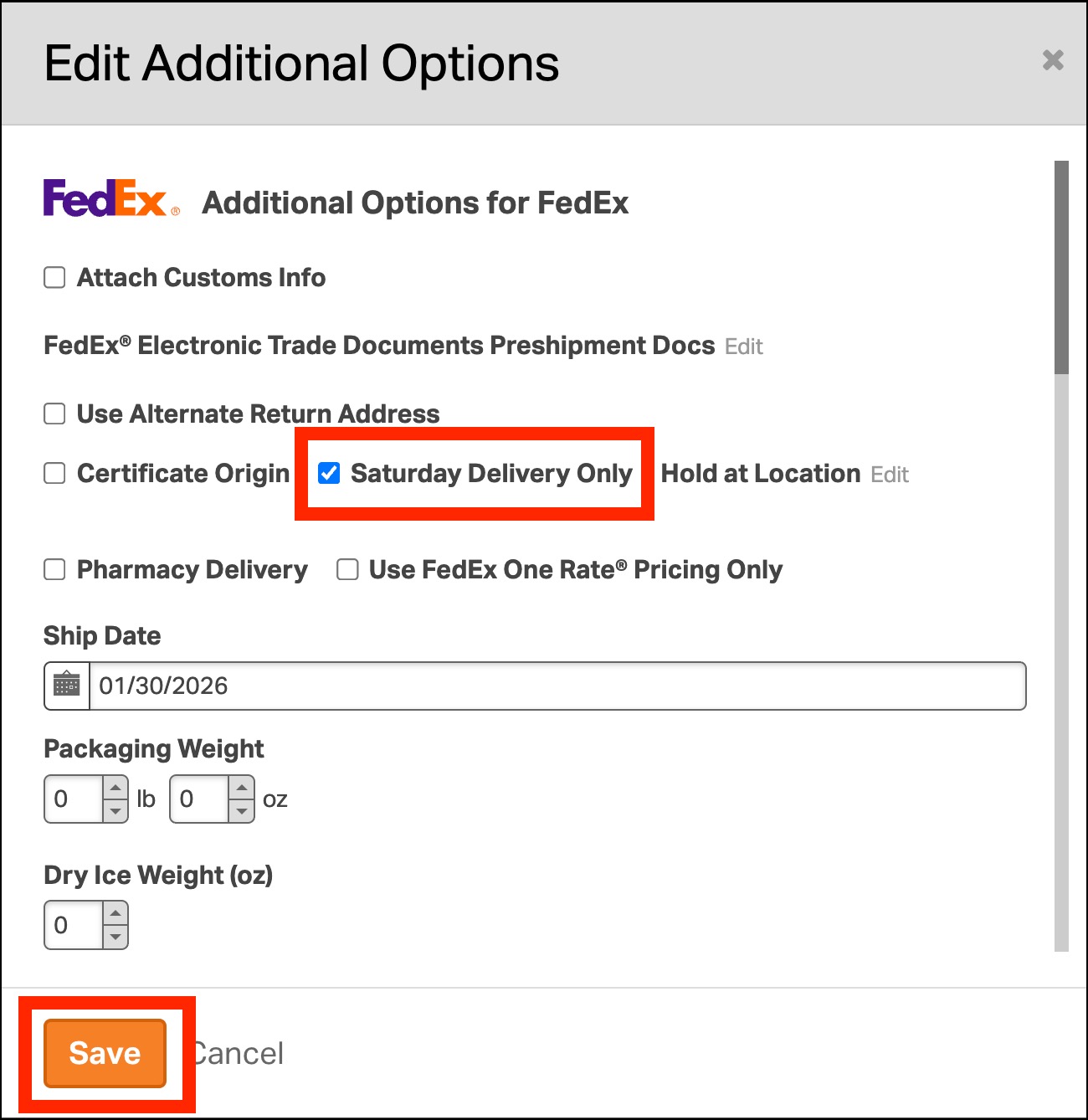
- Review the Rates box. When Saturday Delivery Only is selected, only Saturday Delivery rates will appear.
